




When you’re launching a website, choosing the right hosting plan is just as important as choosing your domain name or website design. One of the most common decisions website owners face is whether to choose managed or unmanaged hosting.
At first glance, both options may seem similar because they provide the server resources your website needs to run. However, the experience of managing your website can vary significantly depending on the hosting type you choose.
In this guide, we’ll explain managed and unmanaged hosting in simple terms, compare their features, discuss their pros and cons, and help you decide which option is best for your needs in 2026.
What Is Managed Hosting?
Managed hosting is a hosting service in which the provider handles most of the technical tasks involved in running a server.
Instead of worrying about software updates, security patches, backups, monitoring, and performance optimization, your hosting company handles these responsibilities for you.
Think of managed hosting as hiring a professional maintenance team for your website. You focus on your business, content, or customers while experts handle the server behind the scenes.
Typical managed hosting services include:
- Server setup and configuration
- Security monitoring
- Automatic updates
- Daily backups
- Malware scanning
- Performance optimization
- Technical support
- Uptime monitoring
This makes managed hosting an attractive option for business owners, bloggers, eCommerce stores, and anyone who wants a hassle-free hosting experience.
What Is Unmanaged Hosting?
Unmanaged hosting provides server resources, but you are responsible for managing everything else.
The hosting provider ensures the hardware and network are operational, but tasks such as server configuration, software installation, security management, and troubleshooting are left entirely to you.
It’s similar to buying a car without a maintenance package. You have complete control, but you’re also responsible for keeping everything running smoothly.
With unmanaged hosting, you typically receive:
- Full root access
- Operating system control
- Server customization options
- Complete software freedom
- Greater flexibility
This type of hosting is usually preferred by developers, system administrators, and businesses with dedicated technical teams.
Managed vs Unmanaged Hosting: The Main Difference
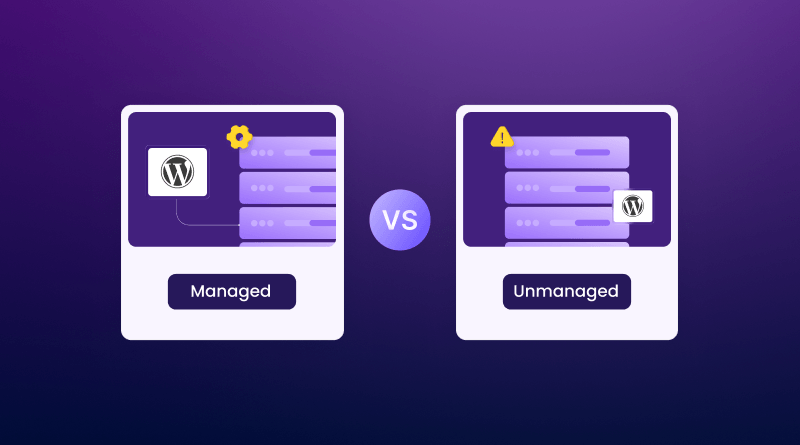
The biggest difference between managed and unmanaged hosting comes down to who is responsible for server management. With managed hosting, the hosting provider handles tasks such as server maintenance, security updates, monitoring, performance optimization, and technical support.
In contrast, unmanaged hosting gives you full control over the server, but you’re responsible for setup, maintenance, security, troubleshooting, and updates. This difference impacts everything from website performance and security to support requirements and overall operational costs.
Feature Comparison
| Feature | Managed Hosting | Unmanaged Hosting |
|---|---|---|
| Server Maintenance | Included | Self managed |
| Security Updates | Automatic | Manual |
| Backups | Included | User managed |
| Technical Support | Extensive | Limited |
| Performance Optimization | Included | Self managed |
| Root Access | Limited or Controlled | Full Access |
| Customization | Moderate | Complete |
| Ease of Use | Beginner Friendly | Advanced |
| Monthly Cost | Higher | Lower |
Benefits of Managed Hosting
1. Saves Time
Managing a server requires ongoing maintenance. Updates, backups, monitoring, and troubleshooting can consume several hours every month.
Managed hosting removes the burden of server management, allowing you to focus on growing your website, business, or online store instead of handling technical tasks. Since the hosting provider takes care of maintenance, security updates, monitoring, and performance optimization, you can save valuable time and reduce operational complexity. For many businesses, this convenience and peace of mind make the additional cost well worth the investment.
2. Better Security
Website security has become increasingly important in recent years.
Managed hosting providers often include:
- Firewall protection
- Malware scanning
- Intrusion detection
- Automatic patching
- DDoS protection
Since security experts monitor the server environment, vulnerabilities are often addressed before they become major issues.
3. Automatic Backups
Accidents can happen at any time, whether it’s a failed plugin update, a configuration error, or the accidental deletion of important files. Managed hosting helps protect your website by including automatic backups and easy restoration options, allowing you to quickly recover your site with minimal downtime. This added layer of protection provides peace of mind and reduces the risk of losing valuable website data.
4. Expert Technical Support
With managed hosting, you get real tech support from people who know what they’re doing, any time you need it. If your site slows down, goes offline, or runs into security or setup headaches, there’s a team that jumps in fast to fix things. For companies that rely on their website to generate leads, make sales, or connect with customers, this dependable support keeps the business running and reduces interruptions.
5. Performance Optimization
Managed hosting providers often fine-tune their infrastructure specifically for performance.
Features may include:
- NVMe SSD storage
- Server-level caching
- CDN integration
- Database optimization
- Resource monitoring
These optimizations help websites load faster and handle traffic more efficiently
Businesses looking for faster website performance can benefit from high-performance web hosting in India.
Drawbacks of Managed Hosting
Higher Cost
The convenience of managed hosting comes at a price. Since the hosting provider handles maintenance and support, managed plans generally cost more than unmanaged alternatives. For small projects or hobby websites, this additional expense may not always be necessary.
Less Flexibility
Some managed hosting providers restrict certain server settings, software installations, or configurations to maintain stability and security. Advanced users who require complete control may find these limitations frustrating.
Benefits of Unmanaged Hosting
1. Lower Hosting Costs
Unmanaged hosting is usually much cheaper because you’re only paying for server resources rather than management services. This makes it attractive for developers, startups, and businesses looking to reduce hosting expenses.
2. Complete Control
With unmanaged hosting, you can configure your server exactly the way you want.
You have the freedom to:
- Install custom software
- Choose your operating system
- Configure security settings
- Create specialized environments
- Optimize performance manually
For experienced users, this flexibility can be extremely valuable.
3. Better Customization
Some applications require unique server configurations that may not be supported in managed environments. Unmanaged hosting allows you to build highly customized hosting setups tailored to specific business requirements.
4. Learning Opportunity
For developers and aspiring system administrators, unmanaged hosting provides hands-on experience with real server management. Managing your own server can help you develop valuable technical skills that are useful in many IT and development careers.
Drawbacks of Unmanaged Hosting
Requires Technical Knowledge
Unmanaged hosting is not ideal for beginners.
You’ll need to understand topics such as:
- Linux administration
- Server security
- Networking
- Software updates
- Backup management
- Performance tuning
Without proper knowledge, maintaining a server can quickly become overwhelming.
Security Responsibility
When using unmanaged hosting, website security becomes your responsibility. If updates are delayed or security settings are configured incorrectly, your server may become vulnerable to attacks. This risk increases as cyber threats continue to evolve.
Time Consuming Maintenance
Managing an unmanaged server isn’t a one-time task.
Regular maintenance includes:
- Monitoring server health
- Installing updates
- Managing backups
- Reviewing logs
- Troubleshooting issues
These tasks require ongoing attention.
Who Should Choose Managed Hosting?
Managed hosting is usually the better option for:
Small Businesses
Managed hosting helps small business owners focus on customers and growth instead of handling server maintenance, security updates, and technical issues.
Businesses looking for dependable infrastructure should consider web hosting solutions for growing businesses that can support increasing traffic and evolving performance requirements.
Bloggers
Bloggers can focus on writing and building their audience because the hosting company handles updates, backups, and security and keeps the website running smoothly.
eCommerce Websites
For online stores, managed hosting means safer transactions, sites that are always up, quick load times, and a support team that jumps in when there’s a problem and shoppers have a hassle-free experience.
Businesses running online stores can benefit from specialized WooCommerce hosting solutions that are optimized for performance, security, and scalability.
Agencies
If you’re handling websites for multiple clients, managed hosting makes life easier. You can keep everything organized, monitor performance, and call for tech help, all from one place.
Beginners
And if you’re new to all this, there’s less to stress about. You can get a site up and running without getting tangled in server setup or complicated tech work with the hosting provider having your back.
Who Should Choose Unmanaged Hosting?
Unmanaged hosting is ideal for:
Developers
Developers often need complete control over their server environments.
System Administrators
Experienced professionals can optimize and secure servers independently.
Tech-Savvy Users
Tech-savvy users who are comfortable with Linux administration and server management can save money while maintaining complete flexibility. Choosing a Linux VPS hosting solution provides greater control over server configurations, software installations, and performance optimization without the limitations of shared hosting.
Businesses with IT Teams
Companies with dedicated technical staff can effectively manage their own infrastructure.
Managed vs Unmanaged Hosting for WordPress
WordPress remains one of the most popular website platforms in 2026.
For most WordPress users, managed hosting offers significant advantages because the provider handles. Choosing a managed wordpress hosting provider can further improve website reliability and speed.
- WordPress updates
- Security monitoring
- Backups
- Performance tuning
- Technical support
However, developers building custom WordPress applications may prefer unmanaged hosting for greater flexibility and control.
The right choice depends on your technical expertise and project requirements.
Which Hosting Option Is Best in 2026?
There isn’t a single answer that works for everyone. If you value convenience, security, expert support, and time savings, managed hosting is often the better investment.
If you have strong technical skills and want maximum control while keeping costs lower, unmanaged hosting can be an excellent choice. Many businesses start with managed hosting and later move to unmanaged environments as their technical capabilities grow.
Final Thoughts
Deciding between managed and unmanaged hosting isn’t really a question of which one is better; it’s more about what fits your skills, your goals, and what you have the bandwidth for. Managed hosting gives you peace of mind because someone else handles server maintenance, security, updates, and support. It’s usually perfect for most website owners and businesses who just want things to work. With unmanaged hosting, you get total control and flexibility, but you’ve got to know what you’re doing and have the time and energy to handle everything yourself.
Before making a decision, consider your technical experience, available time, budget, and long-term goals. The right hosting choice today can make website management much easier as your online presence grows in the years ahead.
Focus on running your website, not fighting with your server. Whether you’re launching a blog, a business website, or an online store, choosing a trusted provider like BigCloudy can simplify website management and support long-term growth.
The main difference is who manages the server. With managed hosting, the hosting provider handles server maintenance, security updates, backups, and technical support. With unmanaged hosting, you are responsible for managing and maintaining the server yourself.
Yes, for many website owners. Managed hosting saves time, improves security, provides expert support, and reduces the need for technical knowledge. Businesses, bloggers, and online stores often find the additional cost worthwhile because it allows them to focus on growth instead of server management.
Unmanaged hosting is best suited for developers, system administrators, and users with server management experience. If you are comfortable handling security, updates, backups, and troubleshooting, unmanaged hosting offers greater flexibility and lower costs.
Managed hosting is generally more secure because hosting providers actively monitor servers, apply security patches, perform malware scans, and manage firewalls. With unmanaged hosting, security depends entirely on how well the user configures and maintains the server.
Managed WordPress hosting is often the preferred choice for most WordPress users because it includes automatic updates, security monitoring, backups, and performance optimization. Unmanaged hosting may be suitable for developers who need advanced customization and full server control.